ProjectThy-4
QQZone项目记录
数据库设计
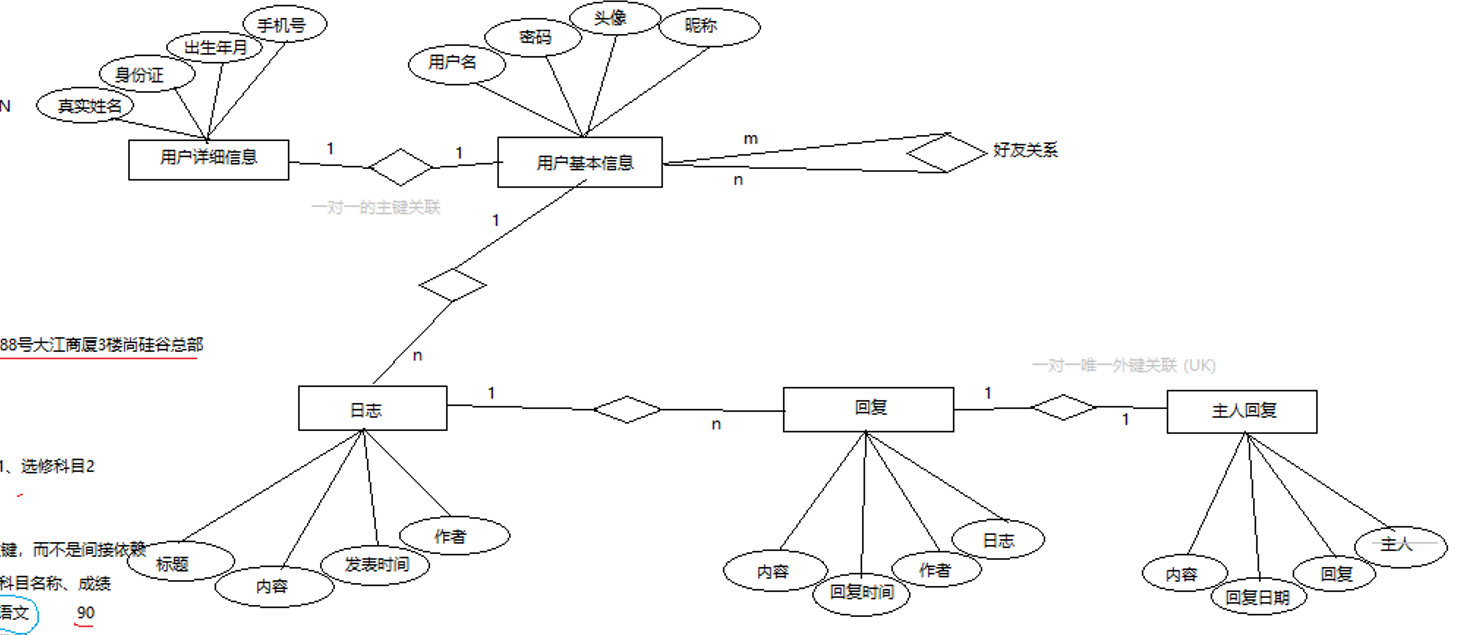
create database qqzonedb char set utf8;

use qqzonedb;

create table `t_user_basic`(
   `id` int(11) not null auto_increment,
   `loginId` varchar(20) not null ,
   `nickName` varchar(50) not null ,
   `pwd` varchar(20) not null ,
   `headImg` varchar(20) default null ,
   PRIMARY KEY (`id`),
   UNIQUE key `loginId` (`loginId`)
)engine = INNODB AUTO_INCREMENT=6 DEFAULT CHARSET =utf8;

insert into `t_user_basic` (id, loginId, nickName, pwd, headImg) values
 (1,'u0001','Aqua','123456','Aqua.png'),
 (2,'u0002','marin','123456','marin.png'),
 (3,'u0003','fbk','123456','fbk.png'),
 (4,'u0004','mio','123456','mio.png')

-- 定义外键约束(foreign key constraint)
-- PRIMARY KEY ('id') 定义主键
-- CONSTRAINT 'FK_detail_basic' 定义了一个外键约束的名字,叫做 FK_detail_basic
-- 这个名字是随便取的,用于区分和管理外键(方便以后修改或删除)
-- FOREIGN KEY ('id') REFERENCES 't_user_basic' ('id')
-- 当前表(比如 t_user_detail)的 id 列是一个外键
-- 它引用(对应)的是 t_user_basic 表里的 id 列
-- 外键约束的作用
-- 保证数据一致性(不能插入“孤立”的 detail 记录)
-- 防止误删(删除 t_user_basic 中的用户时,如果对应的 t_user_detail 还存在,会报错)

create table `t_user_detail`(
    `id` int(11) not null ,
    `realName` varchar(20) default null,
    `tel` varchar(11) default null,
    `email` varchar(30) default null,
    `birth` datetime default null,
    `star` varchar(10) default null,
    primary key (`id`),
    constraint `FK_detail_basic` foreign key (`id`) REFERENCES `t_user_basic` (`id`)
)engine = INNODB DEFAULT CHARSET =utf8;
-- KEY 'FK_friend_basic_uid' ('uid')
-- 这是在 uid 字段上建立一个普通索引(或辅助索引)它的作用是:
-- 提高根据 uid 查询的效率;
-- 为后面的外键约束提供索引支持(MySQL 要求外键列必须有索引)

-- CONSTRAINT 'FK_friend_basic_fid' FOREIGN KEY ('fid') REFERENCES 't_user_basic' ('id')
-- 定义了一个外键约束:当前表的 fid 字段,引用 t_user_basic 表的 id 字段。
-- fid 必须是 t_user_basic 表中已经存在的用户 ID,否则不能插入

-- FK_friend_basic_uid 这个确实是外键约束的名字(别名):用于区分不同的外键约束;用于管理或修改外键
--
create table `t_friend` (
`id` int(11) not null auto_increment,
`uid` int(11) default null,
`fid` int(11) default null,
primary key (`id`),
key `FK_friend_basic_uid` (`uid`),
key `FK_friend_basic_fid` (`fid`),
constraint `FK_friend_basic_fid` foreign key (`fid`) references `t_user_basic` (`id`),
constraint `FK_friend_basic_uid` foreign key (`uid`) references `t_user_basic` (`id`)
) engine = INNODB AUTO_INCREMENT=11 DEFAULT CHARSET =utf8;

insert into `t_friend`(`id`,`uid`,`fid`) values
(1,1,2),
(2,1,3),
(3,1,4),
(4,2,3),
(5,2,4),
(6,3,4);

create table `t_topic`(
`id` int(11) not null auto_increment,
`title` varchar(100) not null ,
`content` varchar(500) not null ,
`topicDate` datetime not null ,
`author` int(11) not null ,
primary key (`id`),
key `FK_topic_basic` (`author`),
constraint `FK_topic_basic` foreign key (`author`) references `t_user_basic` (`id`)
)engine = INNODB AUTO_INCREMENT=4 DEFAULT CHARSET =utf8;

insert into `t_topic` (`id`,`title`,`content`,`topicDate`,`author`) values
(1,'我的空间已开通','Hello 我是 Aqua','2025-10-14 14:29:50',1);

create table `t_reply`(
`id` int(11) not null auto_increment,
`content` varchar(500) not null ,
`replyDate` DATETIME not null ,
`author` int(11) not null ,
`topic` int(11) not null ,
primary key (`id`),
key `FK_reply_basic` (`author`),
key `FK_reply_topic` (`topic`),
constraint `FK_reply_basic` foreign key (`author`) references `t_user_basic` (`id`),
constraint `FK_reply_topic` foreign key (`topic`) references `t_topic` (`id`)
)engine = INNODB AUTO_INCREMENT = 17 DEFAULT CHARSET utf8;

insert into `t_reply` (`id`,`content`,`replyDate`,`author`,`topic`) values
(1,'这里是回复2','2025-10-14 14:36:00',1,1),
(2,'这里是回复3','2025-10-14 14:37:00',1,2);

create table `t_host_reply`(
   `id` int(11) not null auto_increment,
   `content` varchar(500) not null ,
   `hostReplyDate` DATETIME not null ,
   `author` int(11) not null ,
   `reply` int(11) not null ,
   primary key (`id`),
   key `FK_host_basic` (`author`),
   key `FK_host_reply` (`reply`),
   constraint `FK_host_basic` foreign key (`author`) references `t_user_basic` (`id`),
   constraint `FK_host_reply` foreign key (`reply`) references `t_reply` (`id`)
)engine = INNODB AUTO_INCREMENT = 4 DEFAULT CHARSET utf8;

insert into `t_host_reply` (`id`,`content`,`hostReplyDate`,`author`,`reply`)
values(1,'这里是主人回复','2025-10-14 14:46:30',1,1);
资源目录
applicationContext.xml
<?xml version="1.0" encoding="utf-8" ?>
<!DOCTYPE beans [
    <!--定义元素根节点 * 一个或多个 -->
    <!ELEMENT beans (bean*)>
    <!--定义元素bean子节点 * 一个或多个 -->
    <!ELEMENT bean (property*)>
    <!--定义元素property节点 类型为字符串 -->
    <!ELEMENT property (#PCDATA)>
    <!--定义节点上的属性-->
    <!ATTLIST bean id ID #REQUIRED>
    <!ATTLIST bean class CDATA #REQUIRED>
    <!ATTLIST property name CDATA #REQUIRED>
    <!ATTLIST property ref IDREF #REQUIRED>
]>

<beans>
    <!--1. DAO配置 -->
    <bean id="userBasicDao" class="com.muxia.qqzone.dao.impl.UserBasicDaoImpl"/>

    <!--2. Service配置 -->
    <bean id="userBasicService" class="com.muxia.qqzone.service.impl.UserBasicServiceImpl">
        <property name="userBasicDao" ref="userBasicDao"/>
    </bean>

    <!--3. Controller配置 -->
    <bean id="user" class="com.muxia.qqzone.controller.UserController">
        <property name="userBasicService" ref="userBasicService"/>
    </bean>
</beans>
jdbc.properties
DRIVER=com.mysql.cj.jdbc.Driver
URL=jdbc:mysql://39.106.41.164:3306/qqzonedb?useSSL=false&serverTimezone=UTC&characterEncoding=utf8
USER=mysql
PWD=Yxecg123
封装Pojo
UserBasic
package com.muxia.qqzone.pojo;

import java.util.List;

/*
* 基本用户信息
* */
public class UserBasic {

    private Integer id;
    private String loginId;
    private String pwd;
    private String nickName;
    private String headImg;

    // 与 用户详情表 1 对 1 关系 1:1 PK
    private UserDetail userDetail;
    // 与 日志表 1对多关系
    private List<Topic> topicList;
    // 与 好友表 多对多关系
    private List<UserBasic> friendList;

    public UserBasic(){};

    public Integer getId() {
        return id;
    }

    public void setId(Integer id) {
        this.id = id;
    }

    public String getLoginId() {
        return loginId;
    }

    public void setLoginId(String loginId) {
        this.loginId = loginId;
    }

    public String getPwd() {
        return pwd;
    }

    public void setPwd(String pwd) {
        this.pwd = pwd;
    }

    public String getNickName() {
        return nickName;
    }

    public void setNickName(String nickName) {
        this.nickName = nickName;
    }

    public String getHeadImg() {
        return headImg;
    }

    public void setHeadImg(String headImg) {
        this.headImg = headImg;
    }

    public UserDetail getUserDetail() {
        return userDetail;
    }

    public void setUserDetail(UserDetail userDetail) {
        this.userDetail = userDetail;
    }

    public List<Topic> getTopicList() {
        return topicList;
    }

    public void setTopicList(List<Topic> topicList) {
        this.topicList = topicList;
    }

    public List<UserBasic> getFriendList() {
        return friendList;
    }

    public void setFriendList(List<UserBasic> friendList) {
        this.friendList = friendList;
    }
}
UserDetail
package com.muxia.qqzone.pojo;

import java.sql.Date;

/*
* 用户-详情
* */
public class UserDetail {
    private Integer id ;
    private String realName ;
    private String tel ;
    private String email ;
    private Date birth ; // 这里使用sql包中的Date,只有年月日即可
    private String star ;

    public UserDetail(){}

    public Integer getId() {
        return id;
    }

    public void setId(Integer id) {
        this.id = id;
    }

    public String getRealName() {
        return realName;
    }

    public void setRealName(String realName) {
        this.realName = realName;
    }

    public String getTel() {
        return tel;
    }

    public void setTel(String tel) {
        this.tel = tel;
    }

    public String getEmail() {
        return email;
    }

    public void setEmail(String email) {
        this.email = email;
    }

    public Date getBirth() {
        return birth;
    }

    public void setBirth(Date birth) {
        this.birth = birth;
    }

    public String getStar() {
        return star;
    }

    public void setStar(String star) {
        this.star = star;
    }
}
Topic
package com.muxia.qqzone.pojo;

import java.util.Date;
import java.util.List;

/*
* 日志-帖子
* */
public class Topic {
    private Integer id;
    private String title ;
    private String content ;
    private Date topicDate ;
    // 与 基本信息表 多对1关系
    private UserBasic author ;
    // 与 回复表 1对多关系
    private List<Reply> replyList;

    public Topic(){}

    public Integer getId() {
        return id;
    }

    public void setId(Integer id) {
        this.id = id;
    }

    public String getTitle() {
        return title;
    }

    public void setTitle(String title) {
        this.title = title;
    }

    public String getContent() {
        return content;
    }

    public void setContent(String content) {
        this.content = content;
    }

    public Date getTopicDate() {
        return topicDate;
    }

    public void setTopicDate(Date topicDate) {
        this.topicDate = topicDate;
    }

    public UserBasic getAuthor() {
        return author;
    }

    public void setAuthor(UserBasic author) {
        this.author = author;
    }

    public List<Reply> getReplyList() {
        return replyList;
    }

    public void setReplyList(List<Reply> replyList) {
        this.replyList = replyList;
    }
}
Reply
package com.muxia.qqzone.pojo;

import java.util.Date;
/*
* 别人回复铁子表
* */

public class Reply {

    private Integer id ;
    private String content ;
    private Date replyDate ;
    // 与 基本信息表 多 对 1 关系
    private UserBasic author ;  //M:1
    // 与 话题表 多 对 1 关系
    private Topic topic ;   //M:1
    // 与 主人回复表 1 对 1 关系
    private HostReply hostReply ;

    public Reply() {
    }

    public Integer getId() {
        return id;
    }

    public void setId(Integer id) {
        this.id = id;
    }

    public String getContent() {
        return content;
    }

    public void setContent(String content) {
        this.content = content;
    }

    public Date getReplyDate() {
        return replyDate;
    }

    public void setReplyDate(Date replyDate) {
        this.replyDate = replyDate;
    }

    public UserBasic getAuthor() {
        return author;
    }

    public void setAuthor(UserBasic author) {
        this.author = author;
    }

    public Topic getTopic() {
        return topic;
    }

    public void setTopic(Topic topic) {
        this.topic = topic;
    }

    public HostReply getHostReply() {
        return hostReply;
    }

    public void setHostReply(HostReply hostReply) {
        this.hostReply = hostReply;
    }
}
HostReply
package com.muxia.qqzone.pojo;

import java.util.Date;

public class HostReply {
    private Integer id ;
    private String content ;
    private Date hostReplyDate ;
    private UserBasic author ;
    // 与 回复表 1 对 1 关系
    private Reply reply ;

    public HostReply() {
    }

    public Integer getId() {
        return id;
    }

    public void setId(Integer id) {
        this.id = id;
    }

    public String getContent() {
        return content;
    }

    public void setContent(String content) {
        this.content = content;
    }

    public Date getHostReplyDate() {
        return hostReplyDate;
    }

    public void setHostReplyDate(Date hostReplyDate) {
        this.hostReplyDate = hostReplyDate;
    }

    public UserBasic getAuthor() {
        return author;
    }

    public void setAuthor(UserBasic author) {
        this.author = author;
    }

    public Reply getReply() {
        return reply;
    }

    public void setReply(Reply reply) {
        this.reply = reply;
    }
}
登陆功能
控制层
UserController
package com.muxia.qqzone.controller;

import com.muxia.qqzone.pojo.UserBasic;
import com.muxia.qqzone.service.UserBasicService;

import javax.servlet.http.HttpSession;

public class UserController {
    private static final String PAGE_INDEX = "index";
    private static final String LOGIN_SUCC = "redirect:user.do";
    private static final String LOGIN_FAIL = "redirect:page?page=login";

    // 声明 用户 service
    private UserBasicService userBasicService ;

    public String login(String loginId, String pwd, HttpSession session){
        UserBasic userBasic = userBasicService.login(loginId,pwd);
        if (userBasic != null){
            // userBasic这个key用来代表登陆者
            session.setAttribute("userBasic",userBasic);
            return PAGE_INDEX;
        }else{
            System.out.println("登陆失败"+userBasic);
            return LOGIN_FAIL;

        }
    }
}
服务层
UserBasicService
package com.muxia.qqzone.service;

import com.muxia.qqzone.pojo.UserBasic;

public interface UserBasicService {
    UserBasic login(String loginId,String pwd);
}
UserBasicServiceImpl
package com.muxia.qqzone.service.impl;

import com.muxia.qqzone.dao.UserBasicDao;
import com.muxia.qqzone.pojo.UserBasic;
import com.muxia.qqzone.service.UserBasicService;

public class UserBasicServiceImpl implements UserBasicService {
    private UserBasicDao userBasicDao;

    @Override
    public UserBasic login(String loginId, String pwd) {
        return userBasicDao.getUserBasicByLoginIdAndPwd(loginId,pwd);
    }
}
Dao层
UserBasicDao
package com.muxia.qqzone.dao;

import com.muxia.qqzone.pojo.UserBasic;

public interface UserBasicDao {
    // 登陆
    UserBasic getUserBasicByLoginIdAndPwd(String loginId,String pwd);
}
UserBasicDaoImpl
package com.muxia.qqzone.dao.impl;

import com.muxia.qqzone.dao.UserBasicDao;
import com.muxia.qqzone.pojo.UserBasic;
import com.fruit.yuluo.myssm.dao.BaseDao;

public class UserBasicDaoImpl extends BaseDao<UserBasic> implements UserBasicDao {
    @Override
    public UserBasic getUserBasicByLoginIdAndPwd(String loginId, String pwd) {
        return load("select * from t_user_basic where loginId = ? and pwd = ? ",loginId,pwd);
    }
}
前端资源
目录结构

web.xml配置
<?xml version="1.0" encoding="UTF-8"?>
<web-app xmlns="http://xmlns.jcp.org/xml/ns/javaee"
         xmlns:xsi="http://www.w3.org/2001/XMLSchema-instance"
         xsi:schemaLocation="http://xmlns.jcp.org/xml/ns/javaee http://xmlns.jcp.org/xml/ns/javaee/web-app_4_0.xsd"
         version="4.0">
    <!--1 配置thymeleaf前后缀-->
    <context-param>
        <param-name>view-prefix</param-name>
        <param-value>/</param-value>
    </context-param>
    <context-param>
        <param-name>view-suffix</param-name>
        <param-value>.html</param-value>
    </context-param>
    <!--2 配置过滤器编码-->
    <filter>
        <filter-name>CharacterEncodingFilter</filter-name>
        <filter-class>com.fruit.yuluo.myssm.filter.CharacterEncodingFilter</filter-class>
        <init-param>
            <param-name>encoding</param-name>
            <param-value>UTF-8</param-value>
        </init-param>
    </filter>
    <filter-mapping>
        <filter-name>CharacterEncodingFilter</filter-name>
        <url-pattern>*.do</url-pattern>
    </filter-mapping>
    <filter>
        <filter-name>OpenSessionInViewFilter</filter-name>
        <filter-class>com.fruit.yuluo.myssm.filter.OpenSessionViewFilter</filter-class>
    </filter>
    <filter-mapping>
        <filter-name>OpenSessionInViewFilter</filter-name>
        <url-pattern>*.do</url-pattern>
    </filter-mapping>
    <!--2 配置监听器,已使用注解的方式配置-->

    <!--3 配置上下文初始化参数 -->
    <context-param>
        <param-name>contextConfigLocation</param-name>
        <param-value>applicationContext.xml</param-value>
    </context-param>
</web-app>
问题分析
问题1:点击登录后,页面刷新,但 没有发送 POST 请求到 /user.do
原因: Thymeleaf 模板没被渲染成实际路径。打开F12 查看源代码,发现
<form th:action="@{/user.do}" method="post">
表单是否变成
<form action="/user.do" method="post">
检查后发现没有说明 Thymeleaf 没渲染成功
原因是:
你的页面被直接访问了静态路径,比如
👉 http://localhost:8080/assets/login.html
而不是通过 Thymeleaf 渲染的
👉 return "login";
templates 目录中的 .html 文件才会被 Thymeleaf 渲染。
static 目录里的不会。
访问:
http://localhost:8080/login
再点击登录看看是否有请求。
访问页面通过这种方式访问
http://localhost:8080/qqzone/page?page=login
问题2:拿不到 请求 参数的原因
parameter.getName() 在 Java 中默认拿到的不是源码中的参数名,而是 编译后的占位名(arg0、arg1、arg2)!
根本原因:编译时没有保留参数名信息
在 Java 编译时,如果你不加编译参数:
-parameters
配置 -parameters参数,删除out目录,重新编译。
问题3: 静态资源路径
Thymeleaf 模板路径(/templates/) 仅供服务器端查找视图文件使用,
而 静态资源路径(CSS、JS、图片) 应该走 Web 应用上下文路径下的 /static/ 或 /public/ 等目录。
推荐目录结构(标准)
webapp/
 ├─ WEB-INF/
 │    └─ templates/
 │         └─ login.html
 └─ static/
      └─ css/
           └─ login.css
thymeleaf 配置(保持你原来的没问题)
<context-param>
    <param-name>view-prefix</param-name>
    <param-value>/WEB-INF/templates/</param-value>
</context-param>
<context-param>
    <param-name>view-suffix</param-name>
    <param-value>.html</param-value>
</context-param>
页面引用样式:
<link rel="stylesheet" th:href="@{/static/css/login.css}">
首页功能
在 UserController.java 类中添加 list方法
// 首页中的默认方法 list
public String list(HttpSession session){
    // 从session中取出当前登陆者信息
    UserBasic userBasic =(UserBasic) session.getAttribute("userBasic");
    // 加载好友列表
    List<UserBasic> friendList = userBasicService.getFriendList(userBasic);
    // 加载日志列表
    List<Topic> topicList = topicService.getTopicList(userBasic);

    // 设置 属性到 userBasic 对象中
    userBasic.setFriendList(friendList);
    userBasic.setTopicList(topicList);

    // 返回到首页
    return PAGE_INDEX;
}
获取好友列表
创建 service 类
// 接口
// 登陆方法
UserBasic login(String loginId,String pwd);
// 获取用户基本信息
UserBasic getUserBasic(Integer id);
// 获取好友列表方法
List<UserBasic> getFriendList(UserBasic userBasic);
// 实现类
@Override
public UserBasic login(String loginId, String pwd) {
    return userBasicDao.getUserBasicByLoginIdAndPwd(loginId,pwd);
}

@Override
public UserBasic getUserBasic(Integer id) {
    return userBasicDao.getUserBasicById(id);
}

@Override
public List<UserBasic> getFriendList(UserBasic userBasic) {
    return userBasicDao.getFriendList(userBasic);
}
创建 相关控制器类
// 接口

public interface UserBasicDao {
    // 登陆
    UserBasic getUserBasicByLoginIdAndPwd(String loginId,String pwd);
    // 获取用户的好友列表
    List<UserBasic> getFriendList(UserBasic userBasic);
    // 获取用户信息
    UserBasic getUserBasicById(Integer id);
}
// 实现类
@Override
    public UserBasic getUserBasicByLoginIdAndPwd(String loginId, String pwd) {
        return load("select * from t_user_basic where loginId = ? and pwd = ? ;",loginId,pwd);
    }

    @Override
    public List<UserBasic> getFriendList(UserBasic userBasic) {
        Integer id = userBasic.getId();
        String sql = "select t3.* from t_user_basic t1\n" +
                "    left join t_friend t2 on t1.id = t2.uid\n" +
                "    inner join t_user_basic t3 on t2.fid = t3.id\n" +
                "    where t1.id = ?\n" +
                ";";
        return executeQuery(sql,id);
    }

    @Override
    public UserBasic getUserBasicById(Integer id) {
        String sql = "select * from t_user_basic where id = ?;";
        return load(sql,id);
    }
写 相关 Dao
写SQL语句
好友表
id		uid		fid
1		1		2

select * from t1
left join t2
on t1.id = t2.uid
inner join t3
on t2.fid = t3.id
where t1.id = 1;

-- 进一步改装
↓

select * from t_user_basic t1
left join t_friend t2
on t1.id = t2.uid
inner join t_user_basic t3
on t2.fid = t3.id
where t1.id = 1;

-- 进一步改装
↓

select t3.* from t_user_basic t1
left join t_friend t2
on t1.id = t2.uid
inner join t_user_basic t3
on t2.fid = t3.id
where t1.id = 1;
获取日志列表
创建 service 类
// 接口
public interface TopicService {
    // 获取指定用户的日志列表信息
    List<Topic> getTopicList(UserBasic userBasic);
}
// 实现类
private TopicDao topicDao;
@Override
public List<Topic> getTopicList(UserBasic userBasic) {
    return topicDao.getTopicList(userBasic);
}
创建控制器类
// 根据Id获取话题
public String getTopicList(Integer id, HttpSession session){
    System.out.println("getTopicList执行 id = " + id);
    //根据id查询对应的 UserBasic
    UserBasic userBasic = userBasicService.getUserBasicById(id);
    // 查询指定用户的topicList
    List<Topic> topicList = topicService.getTopicList(userBasic);
    // for (Topic topic : topicList) {
    //     System.out.println("topic = " + topic);
    // }
    // // 更新main页面中的 session 中的数据 session.userBasic.topicList中的数据
    userBasic.setTopicList(topicList);
    session.setAttribute("mainBasic",userBasic);
    // 转发到 index页面
    // return "index";
    // 转发到 局部主页框架,只更新main区域
    return "frames/main";
    // return null;
}
创建 相关 Dao 接口
public interface TopicDao {
    List<Topic> getTopicList(UserBasic userBasic);
}
@Override
    public List<Topic> getTopicList(UserBasic userBasic) {
        Integer id = userBasic.getId();
        String sql = "select * from t_topic where author = ?;";
        return executeQuery(sql,id);
    }
组装依赖关系
JavaBean中的applicationContent.xml文件
<!--1. DAO配置 -->
    <bean id="userBasicDao" class="com.muxia.qqzone.dao.impl.UserBasicDaoImpl"/>
    <bean id="topicDao" class="com.muxia.qqzone.dao.impl.TopicDaoImpl"/>
    <!--2. Service配置 -->
    <bean id="userBasicService" class="com.muxia.qqzone.service.impl.UserBasicServiceImpl">
        <property name="userBasicDao" ref="userBasicDao"/>
    </bean>
    <bean id="topicService" class="com.muxia.qqzone.service.impl.TopicServiceImpl">
        <property name="topicDao" ref="topicDao"/>
    </bean>
    <!--3. Controller配置 -->
    <bean id="user" class="com.muxia.qqzone.controller.UserController">
        <property name="userBasicService" ref="userBasicService"/>
        <property name="topicService" ref="topicService"/>
    </bean>
    <bean id="topic" class="com.muxia.qqzone.controller.TopicController">
        <property name="userBasicService" ref="userBasicService"/>
        <property name="topicService" ref="topicService"/>
    </bean>
解决类型映射不匹配
1、修改ClassUtils中的代码,新增一个方法,用于 id 返回一个UserBase对象。同时将旧方法更换方法名。
// 通过反射给实例的属性赋值(ioc注入使用)
    public static void setSimpleProperty(Object obj,String propertyName,Object propertyValue){
        try {
            Field field = obj.getClass().getDeclaredField(propertyName);
            // 忽略警告
            field.setAccessible(true);
            // 赋值
            field.set(obj,propertyValue);
        } catch (NoSuchFieldException e) {
            e.printStackTrace();
        } catch (IllegalAccessException e) {
            e.printStackTrace();
        }
    }
    // 通过反射给实例的属性赋值(普通方法使用)
    public static void setProperty(Object obj,String propertyName,Object propertyValue){
        try {
            Field field = obj.getClass().getDeclaredField(propertyName);
            // 如果这个 field 是 String Integer Boolean Double 类型,那么可以直接赋值
            // 如果这个 field 是 UserBasic Book 等自定一类型,不可以直接赋值,而是new出实例对象,然后再进行赋值
            String fieldTypeName = field.getType().getName(); // java.lang.String
            if (propertyValue != null){
                if (isMyType(fieldTypeName)){
                    // field.getClass() 返回的是 Field 类本身的 Class 对象
                    // Class<? extends Field> fieldClass1 = field.getClass();
                    Class<?> fieldClass = field.getType();
                    // 根据ID创建实例,使用带参的构造方法
                    Constructor constructor = fieldClass.getDeclaredConstructor(Integer.class);
                    // 创建实例
                    propertyValue = constructor.newInstance(propertyValue);

                }
                // 忽略警告
                field.setAccessible(true);
                // 赋值
                field.set(obj,propertyValue);
            }

        } catch (NoSuchFieldException e) {
            e.printStackTrace();
        } catch (IllegalAccessException e) {
            e.printStackTrace();
        } catch (InvocationTargetException e) {
            e.printStackTrace();
        } catch (NoSuchMethodException e) {
            e.printStackTrace();
        } catch (InstantiationException e) {
            e.printStackTrace();
        }
    }
    // 判断是否是自定义类型
    public static boolean isMyType(String className){
        switch (className){
            case "java.lang.String":
            case "java.lang.Integer":
            case "java.lang.Long":
            case "java.util.Date":
            case "java.sql.Date":
            case "java.time.LocalDateTime":
                return false;
            default:
                return true;
        }
    }
在 pojo 中的 topic 类中新增一个 id 构造方法,同时修改Date的数据类型,为localDateTime
import java.time.LocalDateTime;
/*
* 日志-帖子
* */
public class Topic {
    private LocalDateTime topicDate ;

public Topic(Integer id){
        this.id = id;
    }
在 pojo 中的 reply host reply类中新增一个 id 构造方法,同时修改Date的数据类型,为localDateTime
...
修改 ioc 中 注入的设置属性方法的调用,与JavaBean生成实例做区分。
...
Object refObj = beanMap.get(propertyRef); // 这里取出来的是 @xxcc 实例
    // 将refObj赋值给bean的 propertyName 属性
    // 给fruitService实例(@xxzz)中添加了 fruitDao 属性,并指定属性的指向为 FruitDao的实例(@xxcc)
    ClassUtil.setSimpleProperty(bean,propertyName,refObj);
    // 相当于在FruitService类中执行了 FruitDao fruitDao = new FruitDaoImpl()

...
2、java.util.Date ←→ java.time.LocalDateTime 无法直接映射问题
数据库中,topicDate 字段的类型很可能是
DATETIME 或 TIMESTAMP
Java 中,你的实体类写的是
import java.util.Date;

private Date topicDate;
MySQL 8 的 JDBC 驱动(8.0+)默认使用 java.time.LocalDateTime 来解析 DATETIME/TIMESTAMP
解决方式:方式1:
最干净、最现代化的写法。
import java.time.LocalDateTime;

private LocalDateTime topicDate;
数据库仍然是:topic_date DATETIME
方式2:保留 java.util.Date,但加上类型转换器
略
渲染数据
渲染好友列表
index.html
<html lang="en" xmlns:th="http://www.thymeleaf.org">
<head>
    <meta charset="UTF-8">
    <title>QQzone</title>
    <link rel="stylesheet" th:href="@{/css/qqzone-iframe.css}">
</head>
<body>
<!-- 顶部 -->
    <div id="div_top">
        <iframe id="iframeTop" th:src="@{/page(page='frames/top')}" width="100%" frameborder="0" scrolling="no"></iframe>
    </div>
<!-- 主体区域 -->
<div class="main-area">
    <!-- 左侧菜单 -->
    <div id="div_left">
        <iframe id="iframeLeft" th:src="@{/page(page='frames/left')}" width="200px" height="100%" frameborder="0" scrolling="no"></iframe>
    </div>
    <!-- 主内容区 -->
    <div id="div_main">
        <iframe id="iframeMain" th:src="@{/page(page='frames/main')}" frameborder="0" height="600px" scrolling="no"></iframe>
    </div>
</div>
</body>
</html>
left.html
<div>
    <span th:if="${#lists.isEmpty(session.userBasic.friendList)}">暂无好友</span>
  </div>
  <div class="friend-item"
       th:unless="${#lists.isEmpty(session.userBasic.friendList)}"
       th:each="friend : ${session.userBasic.friendList}"
       th:object="${friend}"
       onclick="window.top.document.getElementById('iframeMain').src='/page?page=frames/main'">
    <img src="https://q1.qlogo.cn/g?b=qq&nk=10001&s=100" class="friend-avatar">
    <div class="friend-info">
      <div class="friend-name" th:text="*{nickName}">小明</div>
      <div class="friend-status">点击查看动态</div>
    </div>
  </div>
渲染日志列表
main.html
<div class="main-container">
  <div class="header">
    <h2>动态</h2>
    <button class="btn-new" onclick="createNew()">+ 创建新动态</button>
  </div>

  <table id="topicTable">
    <thead>
    <tr>
      <th style="width: 60px;">序号</th>
      <th>标题</th>
      <th style="width: 180px;">创建日期</th>
      <th style="width: 100px;">操作</th>
    </tr>
    </thead>
    <tbody>
    <tr th:each="topic,status : ${session.userBasic.topicList}"
            th:if="${not #lists.isEmpty(session.userBasic.topicList)}">
      <td th:text="${topic.id}">1</td>
      <td th:text="${topic.title}">今天的心情很好 ☀️</td>
      <td th:text="${topic.topicDate}">2025-10-22 10:00</td>
      <td><button class="btn-delete" onclick="deleteTopic(1)">删除</button></td>
    </tr>
    </tbody>
  </table>

  <div th:unless="${not #lists.isEmpty(session.userBasic.topicList)}"
       id="noData" class="no-data" >暂无动态,点击“创建新动态”开始吧!</div>
</div>
再定义一个 key 用于保存当前 空间显示的是谁的动态 mainBasic
// UserController
public String login(String loginId, String pwd, HttpSession session){
    UserBasic userBasic = userBasicService.login(loginId,pwd);
    if (userBasic != null){
        // userBasic这个key用来代表登陆者
        session.setAttribute("userBasic",userBasic);
        // friend 这个key代表当前空间是谁
        session.setAttribute("mainBasic",userBasic);
        return LOGIN_SUCC;
    }else{
        System.out.println("登陆失败"+userBasic);
        return LOGIN_FAIL;

    }
}
渲染动态
<!--main.html-->
<div class="main-container">
  <div class="header">
    <h2 th:text="|${session.mainBasic.nickName}的动态|"></h2>
    <button class="btn-new" onclick="createNew()">+ 创建新动态</button>
  </div>

  <table id="topicTable">
    <thead>
    <tr>
      <th style="width: 60px;">序号</th>
      <th>标题</th>
      <th style="width: 180px;">创建日期</th>
      <th style="width: 100px;">操作</th>
    </tr>
    </thead>
    <tbody>
    <tr th:each="topic,status : ${session.mainBasic.topicList}"
            th:if="${not #lists.isEmpty(session.mainBasic.topicList)}">
      <td th:text="${topic.id}">1</td>
      <td th:text="${topic.title}">今天的心情很好 ☀️</td>
      <td th:text="${topic.topicDate}">2025-10-22 10:00</td>
      <td><button class="btn-delete" onclick="deleteTopic(1)">删除</button></td>
    </tr>
    </tbody>
  </table>

  <div th:unless="${not #lists.isEmpty(session.mainBasic.topicList)}"
       id="noData" class="no-data" >暂无动态,点击“创建新动态”开始吧!</div>
</div>
返回自己的空间
<!--top.html-->

<head>
    <meta charset="UTF-8">
    <style>
        body { margin: 0; font-family: "Segoe UI", sans-serif; }
        .top-bar {
            background: linear-gradient(90deg, #6c5ce7, #00b894);
            height: 118px;
            color: #fff;
            display: flex;
            align-items: center;
            justify-content: space-between;
            padding: 0 20px;
        }
        .nav a {
            margin: 0 10px;
            color: #fff;
            text-decoration: none;
        }
        .nav a:hover { text-decoration: underline; }
    </style>
    <script src="/qqzone/js/frame-util.js"></script>
</head>
<div class="top-bar">
    <div class="logo">QQZone</div>
    <div class="nav">
        <a href="#">主页</a>
        <a href="#">好友</a>
        <a href="#">消息</a>
        <a href="#">设置</a>
    </div>
    <div class="user-info">
        <span th:text="|欢迎来到 ${session.userBasic.nickName} 的空间|">欢迎来到我的空间</span>
        <a href="javascript:void(0);"
           th:onclick="'openMyZone(' + ${session.userBasic.id} + ')'">我的空间</a>
    </div>
</div>
封装一个frame工具类
用于所有 iframe 跳转、刷新等操作
简单示例:
<!--index-->
<html lang="en" xmlns:th="http://www.thymeleaf.org">
<head>
    <meta charset="UTF-8">
    <title>QQzone</title>
    <link rel="stylesheet" th:href="@{/css/qqzone-iframe.css}">
</head>
<body>
<!-- 顶部 -->
    <div id="div_top">
        <iframe id="iframeTop" th:src="@{/page(page='frames/top')}" width="100%" frameborder="0" scrolling="no"></iframe>
    </div>
<!-- 主体区域 -->
<div class="main-area">
    <!-- 左侧菜单 -->
    <div id="div_left">
        <iframe id="iframeLeft" th:src="@{/page(page='frames/left')}" width="200px" height="100%" frameborder="0" scrolling="no"></iframe>
    </div>
    <!-- 主内容区 -->
    <div id="div_main">
        <iframe id="iframeMain" th:src="@{/page(page='frames/main')}" frameborder="0" height="600px" scrolling="no"></iframe>
    </div>
</div>
</body>
</html>
<!--frame/top-->
<head>
    <meta charset="UTF-8">
    <style>
        body { margin: 0; font-family: "Segoe UI", sans-serif; }
        .top-bar {
            background: linear-gradient(90deg, #6c5ce7, #00b894);
            height: 118px;
            color: #fff;
            display: flex;
            align-items: center;
            justify-content: space-between;
            padding: 0 20px;
        }
        .nav a {
            margin: 0 10px;
            color: #fff;
            text-decoration: none;
        }
        .nav a:hover { text-decoration: underline; }
    </style>
    <script>
        // 动态只渲染到 top区域
        function openMyZone(userId) {
            window.top.document.getElementById('iframeMain').src = '/qqzone/topic.do?oper=getTopicList&id=' + userId;
        }
    </script>
</head>
<body>
<div class="top-bar">
    <div class="logo">QQZone</div>
    <div class="nav">
        <a href="#">主页</a>
        <a href="#">好友</a>
        <a href="#">消息</a>
        <a href="#">设置</a>
    </div>
    <div class="user-info">
        <span th:text="|欢迎来到 ${session.userBasic.nickName} 的空间|">欢迎来到我的空间</span>
        <a th:onclick="'openMyZone(' + ${session.userBasic.id} + ')'">我的空间</a>
    </div>
</div>
// 对应到 控制器 servlet 返回渲染
// TopicController
// 根据Id获取话题
public String getTopicList(Integer id, HttpSession session){
    System.out.println("getTopicList执行 id = " + id);
    //根据id查询对应的 UserBasic
    UserBasic userBasic = userBasicService.getUserBasicById(id);
    // 查询指定用户的topicList
    List<Topic> topicList = topicService.getTopicList(userBasic);
    // for (Topic topic : topicList) {
    //     System.out.println("topic = " + topic);
    // }
    // // 更新main页面中的 session 中的数据 session.userBasic.topicList中的数据
    userBasic.setTopicList(topicList);
    session.setAttribute("mainBasic",userBasic);
    // 转发到 index页面
    // return "index";
    // 转发到 局部主页框架,只更新main区域
    return "frames/main";
    // return null;
}
// /static/js/frame-utils.js
// 然后在你的 index.html(主框架页面)和各个子页面(top、left、main 等)中引入
// <script src="/qqzone/static/js/frame-utils.js"></script>
/**
 * frame-utils.js
 * 用于统一管理 QQ空间 框架(top、left、main、bottom)的 iframe 控制逻辑
 * by liu
 */

// 获取主框架
function getTopDoc() {
  return window.top.document;
}

// 获取各区域 iframe 元素
function getIframe(name) {
  return getTopDoc().getElementById(name);
}

// ========================
// 主区域(main)控制
// ========================

/**
 * 在 main 区域打开指定 URL
 * @param {string} url 要打开的链接
 */
function openInMain(url) {
  const iframe = getIframe("iframeMain");
  if (iframe) iframe.src = url;
}

/**
 * 刷新 main 区域
 */
function reloadMain() {
  const iframe = getIframe("iframeMain");
  if (iframe) iframe.contentWindow.location.reload(true);
}

// ========================
// 业务逻辑封装
// ========================

/**
 * 打开好友空间
 * @param {number|string} friendId 好友ID
 */
function openFriendZone(friendId) {
  openInMain(`/qqzone/topic.do?oper=getTopicList&id=${friendId}`);
}

/**
 * 打开我的空间
 * @param {number|string} userId 当前用户ID
 */
function openMyZone(userId) {
  openInMain(`/qqzone/topic.do?oper=getTopicList&id=${userId}`);
}

/**
 * 打开好友列表页
 * @param {number|string} userId 当前用户ID
 */
function openFriendList(userId) {
  openInMain(`/qqzone/friend.do?oper=getFriendList&id=${userId}`);
}

/**
 * 打开留言板页面
 * @param {number|string} userId 用户ID
 */
function openMessageBoard(userId) {
  openInMain(`/qqzone/message.do?oper=getMessageList&id=${userId}`);
}

/**
 * 打开个人资料页面
 * @param {number|string} userId 用户ID
 */
function openProfile(userId) {
  openInMain(`/qqzone/user.do?oper=viewProfile&id=${userId}`);
}

// ========================
// 其他常用操作
// ========================

/**
 * 打开全新页面(非iframe)
 * 适用于外链或登出
 * @param {string} url
 */
function openNewPage(url) {
  window.top.location.href = url;
}

/**
 * 退出登录(示例)
 */
function logout() {
  openNewPage('/qqzone/user.do?oper=logout');
}
获取详情动态数据
TopicController类中添加 detail 方法
// 根据 topicID 获取详细 动态数据
    public String getTopicDetail(Integer id , HttpSession session){
        // 获取 动态数据对象
        Topic topic = topicService.getTopicWithReplyList(id);
        // 设置到session中
        session.setAttribute("topic",topic);
        // 渲染到 这个页面
        return "frames/detail";
    }
TopicService接口及实现类中添加并实现 getTopicById() 方法,getTopicWithReply()方法
// TopicServiceImpl.java
@Override
public Topic getTopicById(Integer id) {
    return topicDao.getTopicById(id);
}

@Override
public Topic getTopicWithReplyList(Integer id) {
    // 查询topic信息,但是这个topic里面的作者只有id值,没有头像和昵称,而我们页面上需要展示作者的头像和昵称
    Topic topic = getTopicById(id);
    // 查询这篇日志的作者信息(主要是头像和昵称)
    UserBasic author = userBasicService.getUserBasicById(topic.getAuthor().getId());
    topic.setAuthor(author);
    // 获取 回复信息
    List<Reply> replyList = replyService.getReplyListByTopicId(id);
    // 设置 属性
    topic.setReplyList(replyList);
    return topic;
}
TopicDao接口及实现类中添加并实现 getTopicById() 方法
// TopicDaoIMpl
@Override
    public Topic getTopicById(Integer id) {
        return load("select * from t_topic where id = ? " , id);
    }
定义 ReplyService 接口和实现类,添加并实现 getReplyListByTopicId() 方法方法
// ReplyServiceImpl.java
public class ReplyServiceImpl implements ReplyService {
    private ReplyDao replyDao;
    private UserBasicDao userBasicDao;
    @Override
    public List<Reply> getReplyListByTopicId(Integer topicId) {
        // 获取replyList日志列表
        List<Reply> replyList = replyDao.getReplyListByTopicId(topicId);
        // 遍历回复日志列表
        for (Reply reply : replyList) {
            // 获取作者id
            Integer authorId = reply.getAuthor().getId();
            // 获取作者的信息
            UserBasic author = userBasicDao.getUserBasicById(authorId);
            // 设置作者信息到 Reply中
            reply.setAuthor(author);
        }
        return replyList;
    }
}
定义 ReplyDao 接口和实现类,添加并实现 getReplyListByTopicId() 方法
// ReplyDaoImpl.java
public class ReplyDaoImpl extends BaseDao<Reply> implements ReplyDao {
    @Override
    public List<Reply> getReplyListByTopicId(Integer topicId) {
        return executeQuery("select * from t_reply where topic = ? " , topicId);
    }
}
渲染 动态详情 数据
<div class="detail-container" th:object="${session.topic}">
<!-- 主人信息 -->
<div class="owner-info">
<!-- <img th:src="${session.userBasic.headImg}" alt="头像" class="owner-avatar"/>-->
<div class="owner-meta">
<div class="owner-name" th:text="*{author.nickName}">张三</div>
<div class="post-time" th:text="*{topicDate}">2025-10-23 10:20</div>
</div>
</div>
<!-- 动态正文 -->
<div class="topic-content">
<h2 th:text="*{title}">标题</h2>
<p th:text="*{content}">这是动态的正文内容。</p>
</div>
<hr>
<!-- 评论区 -->
<div class="comment-section">
<h3>好友回复</h3>
<!-- <div th:if="${#lists.isEmpty(${session.topic.replyList})}">暂无评论</div>-->
<div class="comment-item" th:each="reply : *{replyList}" th:object="${reply}">
<div class="comment-header">
<span class="comment-user" th:text="*{author.nickName}">李四</span>
<span class="comment-time" th:text="*{replyDate}">2025-10-23 10:40</span>
</div>
<div class="comment-content" th:text="*{content}">很棒的动态!</div>
<!-- 主人回复按钮 -->
<div class="comment-actions">
<button class="btn-reply" th:onclick="'showReplyBox(' + *{id} + ')'">回复</button>
</div>
<!-- 主人回复输入框 -->
<div class="reply-box" th:id="'replyBox-' + *{id}" style="display: none;">
<textarea placeholder="输入回复..." class="reply-text"></textarea>
<button class="btn-send">发送</button>
</div>
</div>
<!-- <!– 新评论输入框 –>-->
<div class="new-comment">
<textarea placeholder="写下你的评论..." name="content"></textarea>
<button class="btn-send">发表评论</button>
</div>
</div>
</div>
配置 javaBean数据
<beans>
    <!--1. DAO配置 -->
    <bean id="userBasicDao" class="com.muxia.qqzone.dao.impl.UserBasicDaoImpl"/>
    <bean id="topicDao" class="com.muxia.qqzone.dao.impl.TopicDaoImpl"/>
    <bean id="replyDao" class="com.muxia.qqzone.dao.impl.ReplyDaoImpl"/>
    <!--2. Service配置 -->
    <bean id="userBasicService" class="com.muxia.qqzone.service.impl.UserBasicServiceImpl">
        <property name="userBasicDao" ref="userBasicDao"/>
    </bean>
    <bean id="replyService" class="com.muxia.qqzone.service.impl.ReplyServiceImpl">
        <property name="replyDao" ref="replyDao"/>
        <property name="userBasicDao" ref="userBasicDao"/>
    </bean>
    <bean id="topicService" class="com.muxia.qqzone.service.impl.TopicServiceImpl">
        <property name="topicDao" ref="topicDao"/>
        <property name="userBasicService" ref="userBasicService"/>
        <property name="replyService" ref="replyService"/>
    </bean>

    <!--3. Controller配置 -->
    <bean id="user" class="com.muxia.qqzone.controller.UserController">
        <property name="userBasicService" ref="userBasicService"/>
        <property name="topicService" ref="topicService"/>
    </bean>
    <bean id="topic" class="com.muxia.qqzone.controller.TopicController">
        <property name="userBasicService" ref="userBasicService"/>
        <property name="topicService" ref="topicService"/>
    </bean>
</beans>
添加主人回复
在 ReplyServiceImpl 类中的getReplyListByTopicId方法中,使用hostReplyService.getHostReplyByReplyId 把主人回复数据也添加进去。在for循环中把主人回复,添加到reply对象的HostReply属性上。
public List<Reply> getReplyListByTopicId(Integer topicId) {
        // 获取replyList日志列表
        List<Reply> replyList = replyDao.getReplyListByTopicId(topicId);
        // 遍历回复日志列表
        for (Reply reply : replyList) {
            // 获取作者id
            Integer authorId = reply.getAuthor().getId();
            Integer replyId = reply.getId();
            // 获取主人回复数据
            HostReply hostReply = hostReplyService.getHostReplyByReplyId(replyId);
            // 获取作者的信息
            UserBasic author = userBasicDao.getUserBasicById(authorId);
            // 设置作者信息到 Reply中
            reply.setAuthor(author);
            reply.setHostReply(hostReply);
        }
        return replyList;
    }
创建 HostReplyService 接口和实现类,添加 getHostReplyByReplyId 方法获取主人回复数据,
public class HostReplyServiceImpl implements HostReplyService {
    private HostReplyDao hostReplyDao;
    @Override
    public HostReply getHostReplyByReplyId(Integer replyId) {
        return hostReplyDao.getHostReplyByReplyId(replyId);
    }
}
创建 HostReplyDao 接口和实现类,添加 getHostReplyByReplyId 方法获取主人回复数据,
public class HostReplyDaoImpl extends BaseDao<HostReply> implements HostReplyDao {
    @Override
    public HostReply getHostReplyByReplyId(Integer replyId) {
        String sql = "select * from t_host_reply where reply = ?";

        return load(sql,replyId);
    }
}
渲染 HostReply 数据
<!-- 评论区 -->
  <div class="comment-section">
    <h3>好友回复</h3>

    <!-- 评论内容区域 -->
    <div class="comment-list">
      <div class="comment-item" th:each="reply : *{replyList}" th:object="${reply}">
        <!-- 评论者信息 -->
        <div class="comment-header">

          <img th:src="*{author.headImg}" alt="头像" class="friend-avatar"/>
          <span class="comment-user" th:text="*{author.nickName}">李四</span>
          <span class="comment-time" th:text="*{replyDate}">2025-10-23 10:40</span>
        </div>

        <!-- 评论内容 -->
        <div class="comment-content" th:text="*{content}">很棒的动态!</div>

        <!-- ========================== -->
        <!-- 如果主人有回复 -->
        <!-- ========================== -->
        <div th:if="*{hostReply != null}" class="owner-reply-box">
      <span class="owner-reply-meta">
        <b th:text="${session.topic.author.nickName}">张三</b> 回复
        <b th:text="*{author.nickName}">李四</b>:
      </span>
          <span class="owner-reply-content" th:text="*{hostReply.content}">
        谢谢你的支持!
      </span>
          <span class="comment-time" th:text="*{hostReply.hostReplyDate}">2025-10-23 11:00</span>
        </div>

        <!-- ========================== -->
        <!-- 如果主人还没回复,显示回复按钮 -->
        <!-- ========================== -->
        <div th:if="*{hostReply == null}" class="comment-actions">
          <button class="btn-reply" th:onclick="'showReplyBox(' + *{id} + ')'">回复</button>
        </div>

        <!-- 主人回复输入框 -->
        <div class="reply-box" th:id="'replyBox-' + *{id}" style="display: none;">
          <textarea placeholder="输入回复..." class="reply-text"></textarea>
          <button class="btn-send">发送</button>
        </div>

      </div>

      <!-- 新评论输入框 -->
      <div class="new-comment">
        <textarea placeholder="写下你的评论..." name="content"></textarea>
        <button class="btn-send">发表评论</button>
      </div>
    </div>
  </div>
</div>
添加回复操作
前端获取数据,定义form表单
<!-- 新评论输入框 -->
  <div class="new-comment" >
    <form th:action="@{/reply.do}" method="post" th:id="'replyForm-' + ${session.topic.id}">
      <input type="hidden" name="oper" value="addReply"/>
      <input type="hidden" name="topicId" th:value="${session.topic.id}"/>
      <textarea name="content" placeholder="输入回复..." class="reply-text"></textarea>
      <button type="submit" class="btn-send">发表评论</button>
    </form>
  </div>
创建 ReplyController 类,添加方法 addReply。
private ReplyService replyService;
// 这里是 客人 向 动态添加 评论
public String addReply(Integer topicId, String content, HttpSession session){
    // 获取评论者主人信息
    UserBasic author = (UserBasic)session.getAttribute("userBasic");
    LocalDateTime now = LocalDateTime.now().withNano(0);
    // String mysqlTime = createTime.format(DateTimeFormatter.ofPattern("yyyy-MM-dd HH:mm:ss"));
    // 创建 reply 实例
    Reply reply = new Reply(content,now,author,new Topic(topicId));
    // 执行添加 操作
    replyService.addReply(reply);

    // 转发页面
    return "redirect:topic.do?oper=getTopicDetail&id="+topicId;
}
更新 ReplyService 接口和实现类,添加 addReply 方法获取主人回复数据
@Override
public void addReply(Reply reply) {
    replyDao.addReply(reply);
}
更新 ReplyDao 接口和实现类,添加 addReply 方法获取主人回复数据
@Override
public void addReply(Reply reply) {
    executeUpdate("insert into t_reply values(0,?,?,?,?)",reply.getContent(),reply.getReplyDate(),reply.getAuthor().getId(),reply.getTopic().getId());
}
配置 applicationContent.xml
<bean id="reply" class="com.muxia.qqzone.controller.ReplyController">
    <property name="replyService" ref="replyService"/>
</bean>
添加主人回复操作
前端渲染样式,定义form表单
<!-- 主人回复输入框 -->
        <div class="reply-box" th:id="'replyBox-' + *{id}" style="display: none;">
          <form th:action="@{/hostReply.do}" method="post" th:id="'replyForm-' + *{id}">
            <input type="hidden" name="oper" value="addHostReply"/>
            <input type="hidden" name="replyId" th:value="*{id}"/> <!-- 回复哪一条评论 -->
            <textarea name="content" placeholder="输入回复..." class="reply-text"></textarea>
            <button type="submit" class="btn-send">发送</button>
          </form>
        </div>
创建 HostReplyController 类,添加方法 addHostReply。
private HostReplyService hostReplyService;
    public String addHostReply(String content,Integer replyId, HttpSession session){
        // 获取 主人信息
        UserBasic author = (UserBasic)session.getAttribute("userBasic");
        // 获取 动态信息
        Topic topic = (Topic) session.getAttribute("topic");
        LocalDateTime now = LocalDateTime.now().withNano(0);
        // 创建 HostReply 实例
        HostReply hostReply = new HostReply(content,now,author,new Reply(replyId));
        // 添加操作
        hostReplyService.addHostReply(hostReply);
        return "redirect:topic.do?oper=getTopicDetail&id="+topic.getId();
    }
创建 HostReplyService 接口和实现类,添加 addHostReply 方法获取主人回复数据
@Override
    public void addHostReply(HostReply hostReply) {
        hostReplyDao.addHostReply(hostReply);
    }
创建 HostReplyDao 接口和实现类,添加 addHostReply方法获取主人回复数据
@Override
    public void addHostReply(HostReply hostReply) {
        String sql = "insert into t_host_reply values(0,?,?,?,?)";
        executeUpdate(sql,hostReply.getContent(),hostReply.getHostReplyDate(),hostReply.getAuthor().getId(),hostReply.getReply().getId());
    }
配置 applicationContent.xml
<bean id="hostReply" class="com.muxia.qqzone.controller.HostReplyController">
        <property name="hostReplyService" ref="hostReplyService"/>
    </bean>
添加新动态操作
前端渲染样式,定义form表单
<div class="card-container">
  <h2>发表新动态</h2>
  <form th:action="@{/topic.do}" method="post">
    <input type="hidden" name="oper" value="addTopic"/>
    <table id="tbl_topic_list">
      <tr>
        <th>标题:</th>
        <td><input type="text" name="title" placeholder="输入动态标题"/></td>
      </tr>
      <tr>
        <th>内容:</th>
        <td><textarea name="content" rows="6" placeholder="写下你的动态内容..."></textarea></td>
      </tr>
      <tr>
        <th colspan="2" style="text-align:center;">
          <input type="submit" value="发表"/>
          <input type="reset" value="重写"/>
        </th>
      </tr>
    </table>
  </form>
</div>
更新 TopicController 类,添加方法 addTopic。
// 添加新Topic
    public String addTopic(String title,String content,HttpSession session){
        UserBasic author = (UserBasic) session.getAttribute("userBasic");
        LocalDateTime now = LocalDateTime.now().withNano(0);
        Topic topic = new Topic(title, content, now, author);
        topicService.addTopic(topic);
        return "redirect:topic.do?oper=getTopicList&id=" + author.getId();
    }
创建 TopicService 接口和实现类,添加 addTopic 方法获取主人回复数据
public void addTopic(Topic topic) {
        topicDao.addTopic(topic);
    }
创建 TopicDao 接口和实现类,添加 addTopic 方法获取主人回复数据
@Override
    public void addReply(Reply reply) {
        executeUpdate("insert into t_reply values(0,?,?,?,?)",reply.getContent(),reply.getReplyDate(),reply.getAuthor().getId(),reply.getTopic().getId());
    }
配置 applicationContent.xml
<bean id="hostReply" class="com.muxia.qqzone.controller.HostReplyController">
        <property name="hostReplyService" ref="hostReplyService"/>
    </bean>
删除回复操作
前端渲染样式,定义form表单
<!-- 删除按钮 -->
<div class="comment-actions">
  <a th:if="${session.userBasic.id == reply.author.id or session.userBasic.id == session.mainBasic.id}"
     th:href="@{/reply.do(oper='delReply',replyId=*{id})}"
     class="btn-delete">删除</a>
</div>
更新 ReplyController 类,添加方法 delReply。
public String delReply(Integer replyId,HttpSession session){
    System.out.println("replyId = " + replyId);
    replyService.delReply(replyId);

    Topic topic = (Topic) session.getAttribute("topic");
    return "redirect:topic.do?oper=getTopicDetail&id="+topic.getId();
}
创建 ReplyService 接口和实现类,添加 delReply 方法获取主人回复数据
public void delReply(Integer replyId) {
    //先删除主人回复
    hostReplyService.delHostReplyByReplyId(replyId);
    // 删除回复
    replyDao.delReplyById(replyId);
}
创建 ReplyDao 接口和实现类,添加 delReply 方法获取主人回复数据
public void delReplyById(Integer replyId) {
    executeUpdate("delete from t_reply where id = ? " ,replyId);
}
配置 applicationContent.xml
删除Reply之前,需要先将 HostReply 删除,因为HostReply依赖Reply,先删除从表数据,主表才可以删除。
public void delReply(Integer replyId) {
    //先删除主人回复
    hostReplyService.delHostReplyByReplyId(replyId);
    // 删除回复
    replyDao.delReplyById(replyId);
}
更新 HostReplyService 接口和实现类,添加 delHostReplyById 方法,删除主人回复数据
public void delHostReplyByReplyId(Integer replyId) {
    hostReplyDao.delHostReplyByReplyId(replyId);
}
更新 HostReplyDao 接口和实现类,添加 delHostReplyById 方法,删除主人回复数据
public void delHostReplyByReplyId(Integer replyId) {
    executeUpdate("delete from t_host_reply where reply = ? ",replyId) ;
}
删除日志
删除Topic 之前,需要先将 HostReply 删除,再删除 Reply,最后删除Topic
前端页面功能渲染,发送请求
更新 TopicController 类,添加 delTopic 方法
更新 TopicService 接口和实现类,添加delTopic 方法
更新 TopicDao 接口和实现类,添加 delTopic 方法
更新 ReplyService 接口和实现类,添加 delReplyById方法,取出所有的 Reply 列表,遍历,删除
更新 HostReplyService 接口和实现类,添加delHostReplyById 方法
更新 HostReplyDao 接口和实现类,添加 delHostReplyById 方法